

How a Browser Works: A Beginner-Friendly Guide to Browser Internals
We all access the internet using the browsers which in itself a huge and nice software that works like operating system inside your computers. So understanding its internal will open up our brain. This will make us think of the whole flow of executions that takes place when a you search a link in the URL box. In this blog we are going to go little deep inside the browsers.
What happens after I type a URL and press Enter ?
Lets first go through what happens when you types a URL like www.google.com in the search tab and presses enter. So below are the complete flow of what happens:
DNS Drama
The browser first checks the DNS cache for the IP addresses. This is saved inside the browser itself(inside its own disk memory). This cache invalidation is decided by the browsers itself.
So for now we are considering that the browser hasn’t got the IP address and now it will move to the next step i.e. checking the OS cache for the same and again we will skip this by considering it is not present.
After checking all the cache if the browser does not find anything then request enters the DNS Resolver which recursively finds the IP address.
At first the request from the DNS Resolves enters the Root DNS Server there it comes comes to know where to find TLD Server(.com, .in, .ai, etc.)
After this the request enter the TLD Server where it comes to know about the Authoritative DNS Server. Here the request is able to find the the domain name.
The authoritative server returns the NS record of the domain name followed by the A record. This A record is the place where the actual IP address is returned.
Now at this step the browser gets the IP address of the server and is ready to proceed with the next steps.
TCP Handshake
Now once the browser has the IP now it will initiate the three way handshake with the server in order to establish the TCP Connection.
After this TLS handshakes is attempted by exchanging the certificates and verifying the server.
After a successful TCP connections now the HTTP comes into the picture and http GET request is being sent to the server.
In the response the client receives the required files in which the first thing comes is HTML.
HTML and CSS Processing
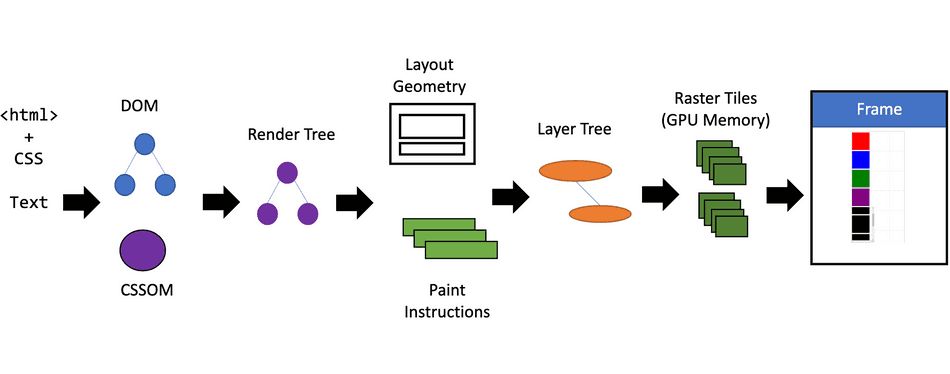
So here the browsers starts receiving the HTML in the form of stream means it don’t wait for the full html to come.
Parser
At first this streamed HTML is processed by the browser’s HTML Parser and on the other hand the CSS is parsed using the CSS Parser.
This parser first converts the unstructured streamed HTML texts(bytes) into tokens. This token make sure that the data is well structured and hierarchical.
After this token are converted to a tree like structure maintaining the hierarchy and this is passed to DOM(Document Object Model)
Same parsing is done by the CSS parser but the tree structure which is created here is called CSSOM (CSS Object Model) and passed to content sink where both HTML and CSS combines.
Here the parsing of the HTML and CSS ends and is passed to Render Tree(layout tree or frame).
Render Tree
The render tree contains only the nodes that will actually be rendered to the screen and their computed visual styles.
After the render tree is built the browser performs reflow operations. Here the browsers calculate the precise positions and size of every object in the render tree relative to the viewport. This tells the browser where to keep the elements on the screen.
Now finally the painting or rasterization process occurs. This step involves converting each part of the rendered elements into actual pixels on the user's screen.
Now the whole flow gets ended here and you finally able to see the web page on the screen.
Caching Layer
As we see in a simple search what all is done behind the scenes so caching becomes a important layer in all this stuff. The caching is done at different layer in order to make this whole process super fast. Lets see where all the caching takes place:
When the call is made the IP → domain mapping is cached at browser level.
Apart from this the caching is also made for IP → domain at OS(operating system) level, Router level and ISP level (Recursive Resolver).
TCP and TLS connection keys are also cached which make sure that the connection is alive. This cache is mainly used for API requests, image downloading and most of the background fetches which avoid the handshaking time.
After all the built DOM and CSSOM is also cached in the browser’s disk storage to make the user don’t sees the loader for just a tab switch and also avoids reparsing all those stuff.


