

Exploring Linux File System Internals

Most people learn Linux through commands — ls, cd, grep, and so on. But what I discovered is that Linux is not really about commands - it’s about how everything is represented as files.
In this exploration, I went beyond basic usage and investigated how Linux actually works under the hood by navigating its file system. What I found changed how I think about operating systems entirely.
This blog covers my most interesting discoveries and why they matter.
1. /etc — The Brain of System Configuration
What it does: The /etc directory stores system-wide configuration files.
Why it exists: Instead of hardcoding behavior inside binaries, Linux keeps configurations as editable files. This gives flexibility and transparency.
What problem it solves: Centralized configuration management. You can modify system behavior without touching source code.
What I discovered:
/etc/resolv.conf-> controls DNS resolution/etc/hosts-> local DNS override/etc/passwd→ user account metadata
👉 Insight: Linux separates logic (programs) from configuration (files). This is why it's so powerful in production environments.
2. DNS Configuration — /etc/resolv.conf
What it does: Defines which DNS servers your system uses.
Example content:
nameserver 8.8.8.8 or 127.0.0.53(DNS stub listener)
Why it exists: Your system needs a way to translate domain names into IP addresses.
What problem it solves: Without DNS, you had have to remember IPs for every website.
What I discovered:
This file can be overwritten by NetworkManager or systemd
It’s not always “static” — it's often dynamically generated
👉 Insight: Even something as simple as opening a website depends on this tiny file.
3. /proc — The Most Mind-Blowing Directory
What it does: A virtual filesystem that exposes live kernel and process data
Why it exists: To allow user-space programs to interact with kernel internals.
What problem it solves: Gives visibility into system state without needing special tools.
What I explored:
/proc/cpuinfo-> CPU details/proc/meminfo->RAM usage/proc/<pid>/-> per-process info
What I discovered: These are not real files — they are generated in real time.
👉 Insight: Linux treats system state as readable files.
4. /dev — Everything is a Device
What it does: Represents hardware devices as files.
Examples:
/dev/sda-> disk/dev/null->discard output/dev/random-> random data
Why it exists: To unify hardware interaction through file operations.
What problem it solves: Instead of special APIs, you can use normal file I/O to interact with devices.
What I discovered: You can literally write to devices using file commands.
👉 Insight: In Linux, everything is a file — even hardware.
5. /var/log — System Memory (Logs)
What it does: Stores logs generated by the system and applications.
Why it exists: To track system behavior, errors, and events.
What problem it solves: Debugging and monitoring.
What I explored:
/var/log/syslog-> general system logs/var/log/auth.log-> login attempts
What I discovered: Logs reveal real-time system activity, including failures and security events.
👉 Insight: Logs are not just for debugging — they are critical for security and observability.
6. User Management — /etc/passwd and /etc/shadow
What they do:
/etc/passwd-> user info/etc/shadow-> encrypted passwords
Why they exist: To separate public user data from sensitive credentials.
What problem they solve: Security.
What I discovered:
Passwords are not stored in plain text
Access to
/etc/shadowis restricted
👉 Insight: Linux enforces security through file permissions + separation of concerns.
7. Permissions System — More Than Just rwx
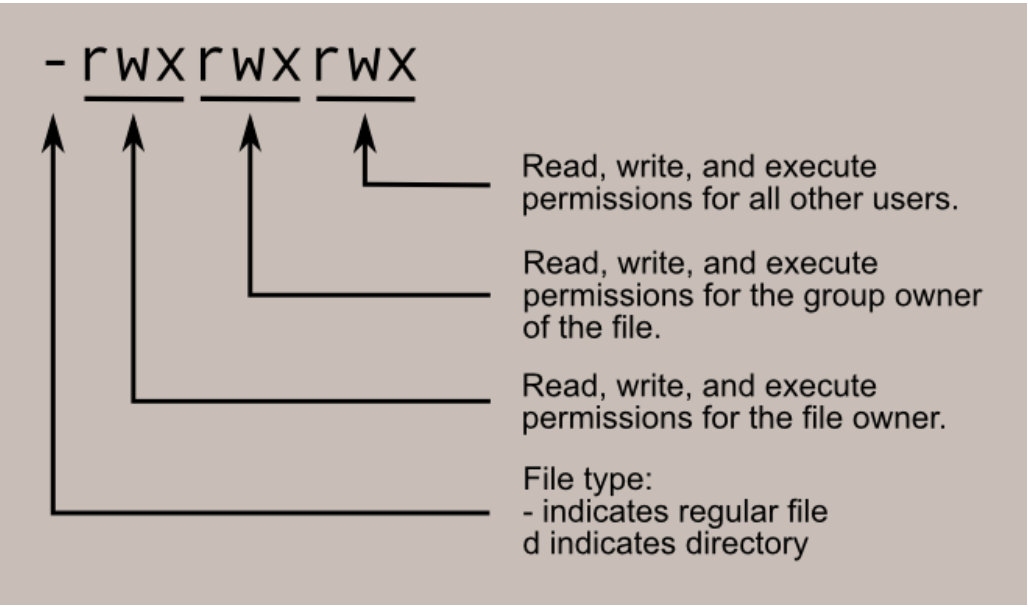
What it does: Controls who can read, write, or execute files.
Why it exists: To prevent unauthorized access.
What problem it solves: Multi-user system safety.
What I discovered:
Permissions are tied to users and groups
Root can override everything
👉 Insight: Linux security is deeply tied to its file system model.
8. /boot — System Startup Secrets
What it does: Contains bootloader files and kernel images.
Why it exists: To initialize the system before the OS fully loads.
What problem it solves: Defines how the system starts.
What I discovered:
Kernel files live here
Bootloader config determines startup behavior
👉 Insight: If /boot breaks, your system won’t start — it is critical infrastructure.
9. System Services — /etc/systemd
What it does: Stores service definitions for systemd.
Why it exists: To manage background services (daemons).
What problem it solves: Automates service startup, monitoring, and control.
What I discovered:
Services are defined as
.servicefilesYou can control system behavior via config
👉 Insight: Modern Linux systems are heavily driven by declarative service configs.
10. Routing and Networking — /proc/net & /etc/network
What it does: Stores network configuration and runtime info.
Why it exists: To manage how data flows through the system.
What problem it solves: Routing, IP configuration, interface management.
What I discovered:
/proc/net/route-> routing table/etc/network/interfaces(or Netplan configs) -> interface setup
👉 Insight: Networking in Linux is transparent — you can inspect everything if you know where to look.
Final Thoughts
This exploration changed how I see Linux.
It’s not just an operating system — it’s a philosophy:
Everything is a file Configuration over hardcoding Transparency over abstraction
Understanding this gives you a huge advantage as a developer. You stop treating the system as a black box and start using it like a tool.
What I Learned
Linux exposes internal state through the filesystem
System behavior is controlled through configuration files
Observability (logs, proc) is built into the OS
Security is enforced through permissions and file separation


